
- Learn how to organize Python Projects in multiple file
- Python Modules
- Python Packages
- Logic of Importing Custom Modules/Packages
📃Organize Python Projects Like a Pro
Once you start working on larger projects you'd want to separate your code into multiple modules and packages. This will help you to structure your code so it's easier to write and maintain it. And then you can bring it all together in a single file (e.g. main.py) to execute your final code.
And don't worry, it's not even complicated to do that.
Also, before we dive in, let's define a few things so it's easier to follow along.
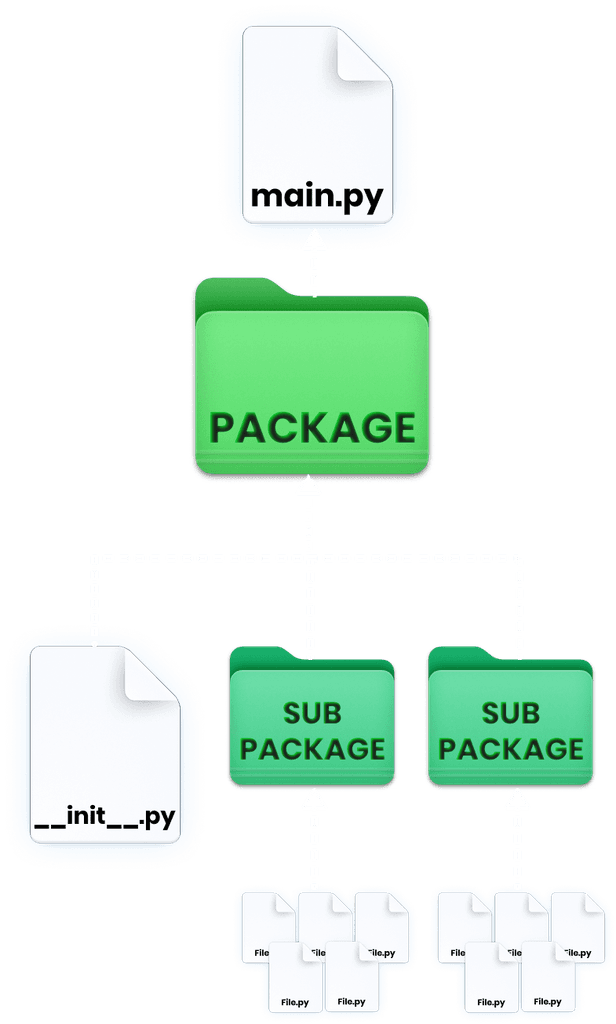
📄Module - is a
.pyfile that contains reusable functions, classes, variables that you can import into other scripts.📁 Package - is a directory (folder) that contains other Modules or Nested-Packages to better organize your reusable code.
Now let's learn how to create and use them.

📂Start Simple - main.py
Let's start with a single main.py file and create a few pseudo-functions. They will just hold print statements so we can track when we execute them and then we'll start to move them around modules and packages to understand how to reuse them.
At the moment it looks simple because we use abstract code. In reality, each function can take hundreds of lines and eventually your file can become a mess with all additional classes, functions and variables necessary for each one.
So it will be great to separate different functionality of your script into its own modules or packages.
So far our project is
📁 root
├─ 📄 gen_audio.py
├─ 📄 gen_images.py
├─ 📄 gen_video.py
└─ 📄 main.py
📄Split Into Modules
Now we're going to start separating functionality into separate modules. This will help us separate the necessary logic for creating audio, images and video.
Sounds logical so far?
And as a reminder:
📄Module - is a
.pyfile th t contains reusable functions, classes, variables that you can import into other scripts.
So create multiple files like this:
📁 root
├─ 📄 gen_audio.py
├─ 📄 gen_images.py
├─ 📄 gen_video.py
└─ 📄 main.py
Now let's update each file as following:
And finally, we can import all of these functions back so we can execute them directly from main.py file. To import anything from modules we need to reference the file name and then bring the functions, variables or classes that we need.
Here are some abstract examples:
And here's how it's going to look inside our main.py file to bring functions from our new modules.
And this is what we get in the console - A Mess!
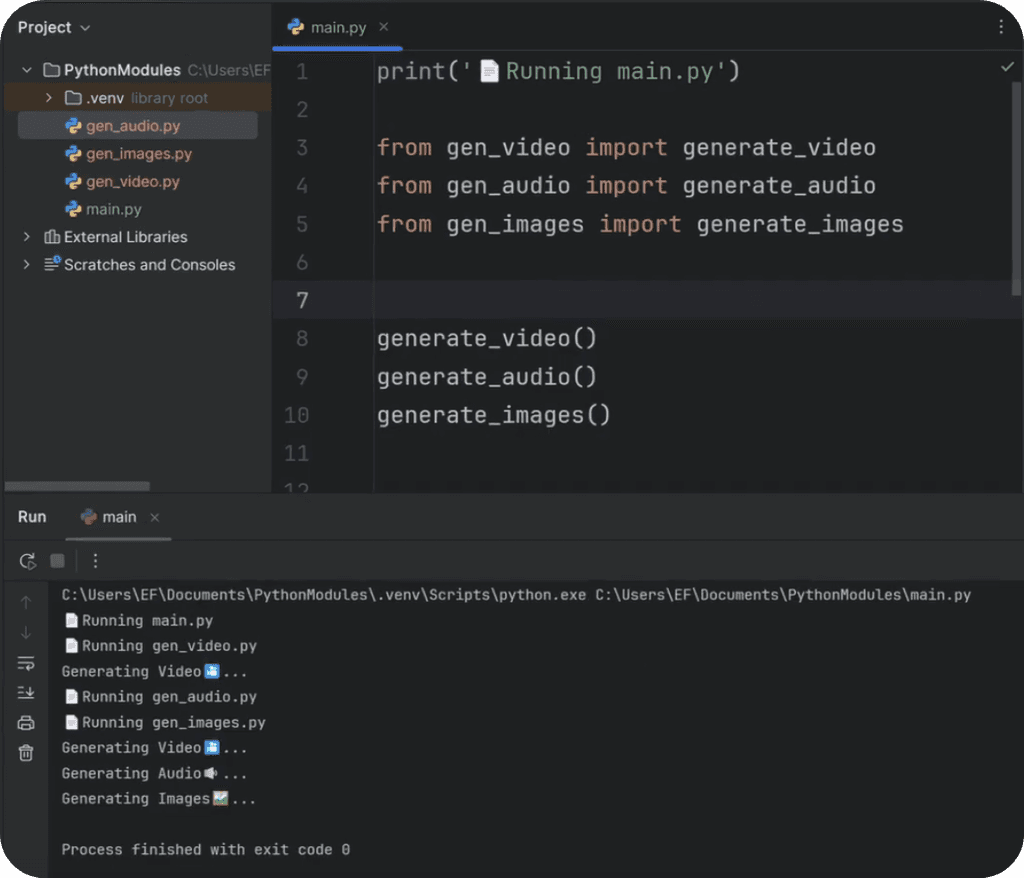
It looks like a mess but that's exactly what our code is supposed to do...
Let's break it down. We execute main.py file and then we start importing functions from our new modules. And when we import something from a module, we'll execute the code inside that module. therefore we can see multiple print statements from each file. And only then we execute these imported functions and get their print statements.
Now, we need to fix it ASAP and we can use __main__ statement for that.
🎯 'Main' Statement
In Python we can execute a very special command to check if it's executed from inside itself, or it's just being imported. And it looks like this:
💡It doesn't matter how your file is code. It's always the same line of code.
Also the main statement only runs code when file is run directly, not when it's imported. This is how you can control your code execution directly from a file.
So let's go back to our new modules (gen_images.py, gen_audio.py, gen_video.py) and add this special statement so we only print if we execute code from inside these files.
Now the code that we put under if __name__ == '__main__': will only be execute when we run the file directly. This is important when you start working with modules/packages in Python.
It's also a great way to keep working inside each file individually with your local tests, and then when it's ready you can import it to the main file and local test won't be executed. Great for quick development.
And now here's how it looks:
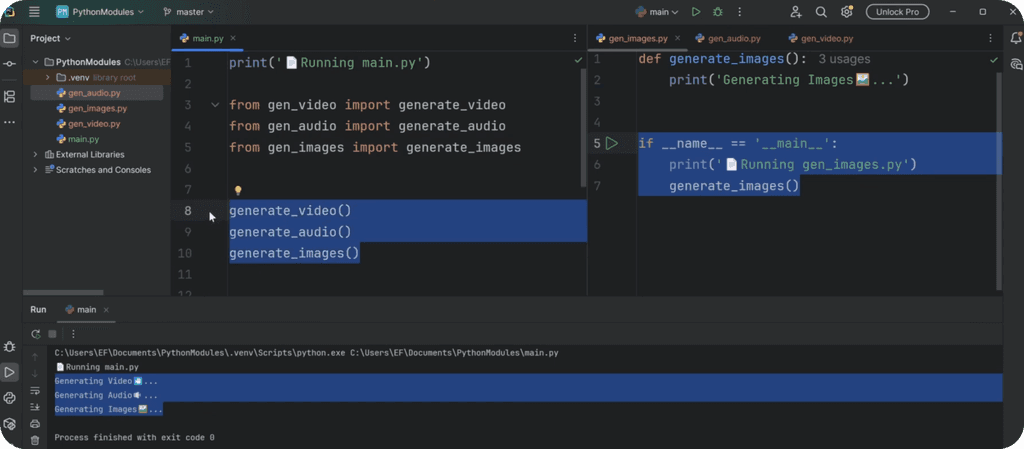
⚠️ I highly recommend you to spend some time on this step and execute each file individually. This will help you better understand the logic by seeing what's being printed and what's not.
📂 Organize Code In Packages
Now you know how to organize code in modules but that won't be enough.
Imagine your program grows and you need multiple files for each part (Audio, Video, Image). On top of that you might be creating lots of local files and you want to keep everything nicely organized.
How? Well, Packages of course!
📁 Package - is a directory (folder) that contains other Modules or Nested-Packages to better organize your reusable code.
So for now create a simple Packages called generators and move your modules inside of it. Also create an empty __init__.py file and ignore it for now. We'll cover it in a moment.
You project structure should look like this:
📁 root
├─ 📄 main.py
└─📁 generators
├─ 📄 __init__.py
├─ 📄 gen_audio.py
├─ 📄 gen_images.py
└─ 📄 gen_video.py
Then if you try to execute your main.py file you'll get an error because it can't fine the modules in the previous place.
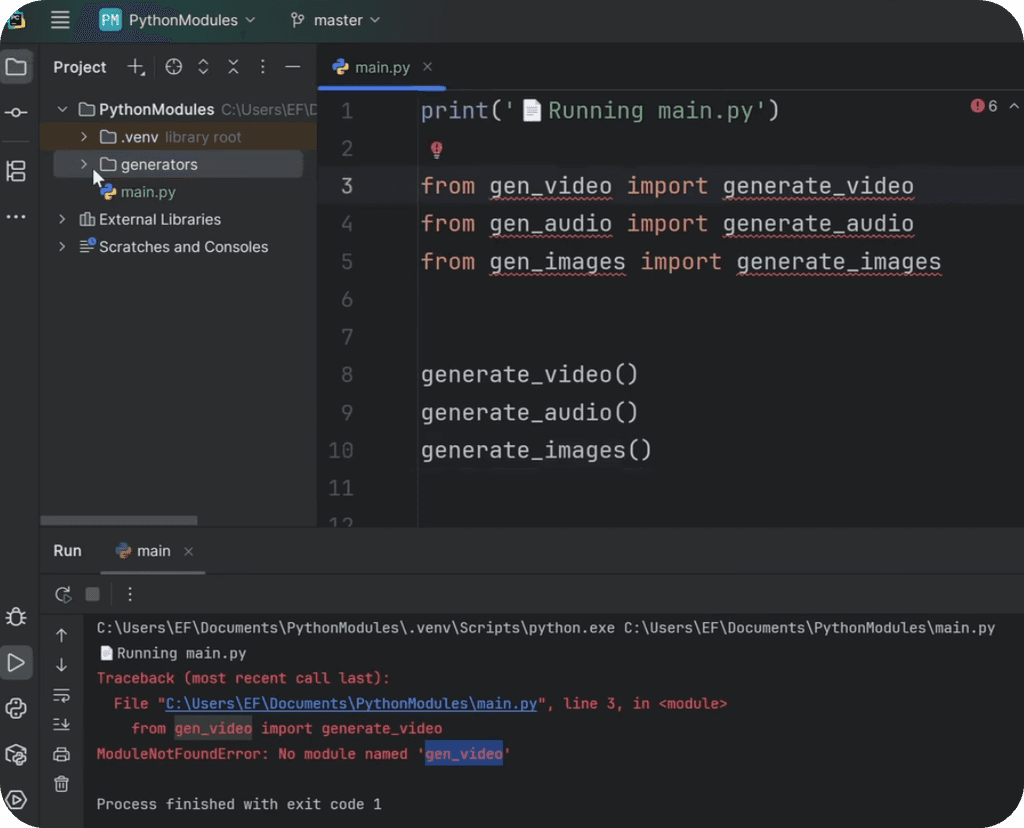
And that's correct. We need to modify out import statement so we bring modules from the right place. Change main.py to this:
So the only difference is that we added the package name before the module name like generators.gen_video ...
Now it will work!
🤔What is __init__.py File?
Let's take a step back and look at __init__.py file we created. This is a special file you put inside folders to mark them as a Package. ON top of that it will get executed the first time your package is used.
So when you import 3 functions from your package, on the first import everything inside of __init__.py file will be executed. In general it's used for logging, printing or creating better import shortcuts.
For example:
Notice the leading dots (from .audio...) that’s a relative import. It tells python "Look next to me inside this package" .
Now why do we import modules inside of __init__.py file? Well, that will allow us to import all these functions directly from the package without going into modules.
So now we can simplify imports in main.py like this:
How cool is that? Now it's so much easier to import you functions from a Package without trying to remember all module names.
🪺 Nested Pacakges
Now let's take it a step further.
Right now we have a single generator package. But what if our code for Audio, Video and Images will start to grow and we might need multiple files to better organize it?
We could just create lots of modules inside of generator and then import whatever is necessary in final modules, but that won't be clean. So, instead I'll create packages inside of a package. This will help me organize my code nicer.
Here's how it would look:
📁 root
├─ 📄 main.py
└─📁 generators
├─ 📄 __init__.py
├─ 📁 images
├ ├─ 📄 __init__.py
├ └─ 📄 gen_images.py
├─ 📁 video
├ ├─ 📄 __init__.py
├ └─ 📄 gen_video.py
└─ 📁 audio
├─ 📄 __init__.py
└─ 📄 gen_audio.py
💡Notice that we create __init__.py files for each nested-module too. They can be empty.
Now everything is very nicely organized and we can still import everything inside of main. We can either import directly from the module like:
Or we could go back to __init__.py file and modify local import there so we keep the same import in the main.py file.
⭐Pro-Tip: How To Find Source Code
Once your project starts to grow and you work with modules and packages it can take time to find the source code of various functions you re-use.
But there is a cool trick, you can select any function and then click on CTRL+B (in pyCharm) and it will open up the right file and take you to the right line where selected function was defined. This is a game changer when you need to find source code to make some changes.
Happy Coding!
🙋♂️ See you in the next lesson.
- EF
It's best for you to watch the full video lesson to better learn about Modules and Packages. And then use the code snippets to try it out yourself.
I tried my best to summarize everything in a written format but it was really hard to keep it easy to read because we work with multiple files. But I hope it was clear enough to follow along.

⌨️ Happy Coding!